
Is SketchUp for iPad the right app?
If you want to model or review a SketchUp file on a tablet, SketchUp for iPad is the official app to investigate first. It combines touch-friendly modeling, Apple Pencil input and model review features in an iPad workflow. The App Store page is the correct place to check the current binary, supported devices, size and region-specific access; those fields can change independently of a web page.
The app is not the same thing as a free desktop installer. SketchUp Free is a separate personal Web route, SketchUp Go is the paid Web-and-iPad plan, and SketchUp Pro is the desktop choice for Windows or macOS, LayOut and a wider extension workflow. Read our SketchUp Go guide when your real question is about plan scope or subscription value rather than the iPad app itself.
A sensible test is small and practical: open a representative model, orbit it, measure one element, make a simple edit, add a component and save or export through the actions available to your account. If the file depends on large textures, desktop extensions, specialist import formats or offline production, keep a desktop path available until the iPad workflow has passed that test.
What you can do in SketchUp for iPad
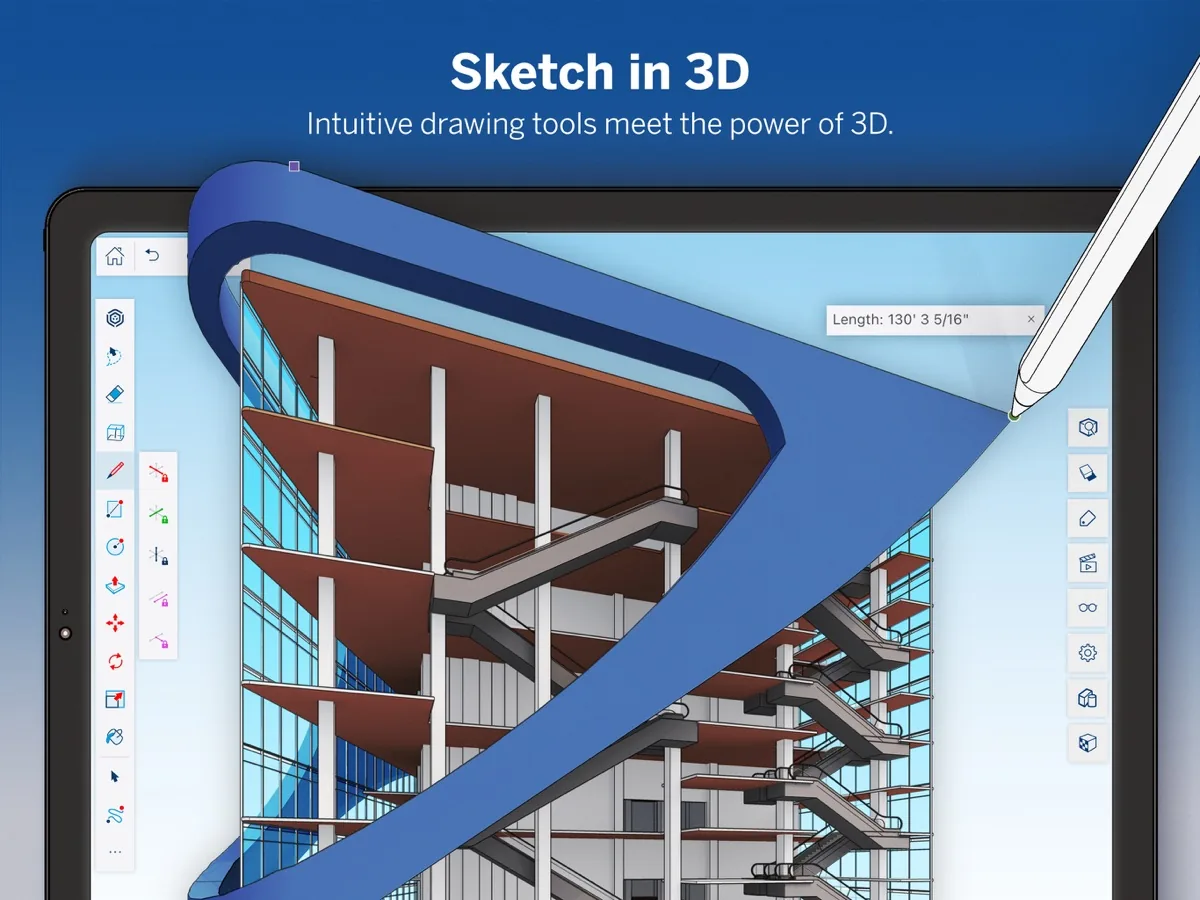
The iPad app is designed around the core modeling loop rather than a simple viewer-only experience. You can draw and edit geometry, navigate a model, measure, work with materials and components, and review a design away from a desk. Touch is useful for direct navigation, while Apple Pencil can make precise selections and handwritten notes feel more natural during a review.
That portability is most useful when the model travels with you: a site visit, a client meeting, a classroom, a material discussion or a quick design study. The best result comes from matching the file to the device. A modest room layout or concept model is a better first test than a heavily textured production file with many extensions and linked resources.
The App Store screenshots show the product as a real modeling workspace, not as a repackaged desktop installer. Use them as a visual reference for the touch-and-pencil workflow, but rely on the current listing and official plan pages for version, compatibility and access details.
- Draw, select, orbit and measure a model with touch controls.
- Use Apple Pencil for precise input and review annotations where supported.
- Open a small SKP file and check the save, export and sharing actions available to your account.
- Test materials, components and 3D Warehouse content before moving a large project.
Scan, draw and mark up models in the field
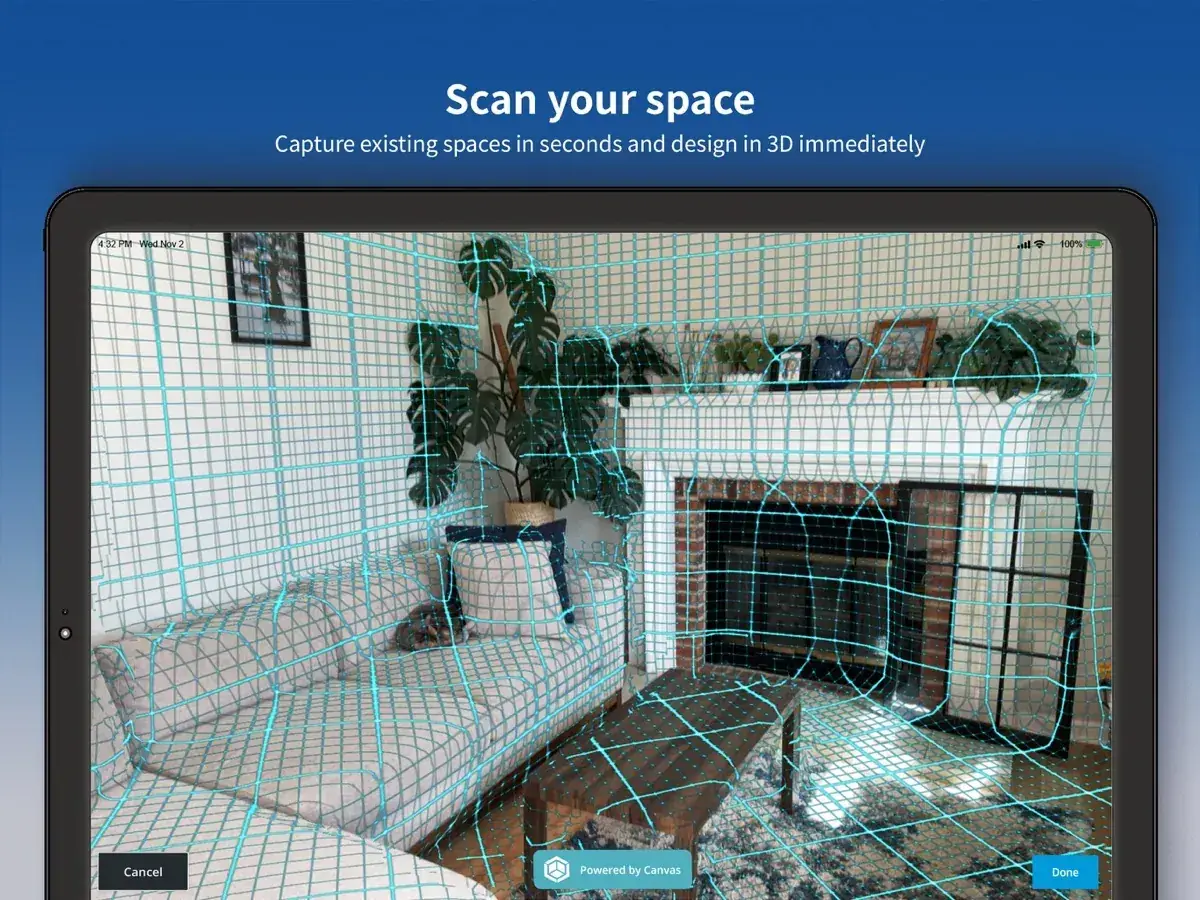
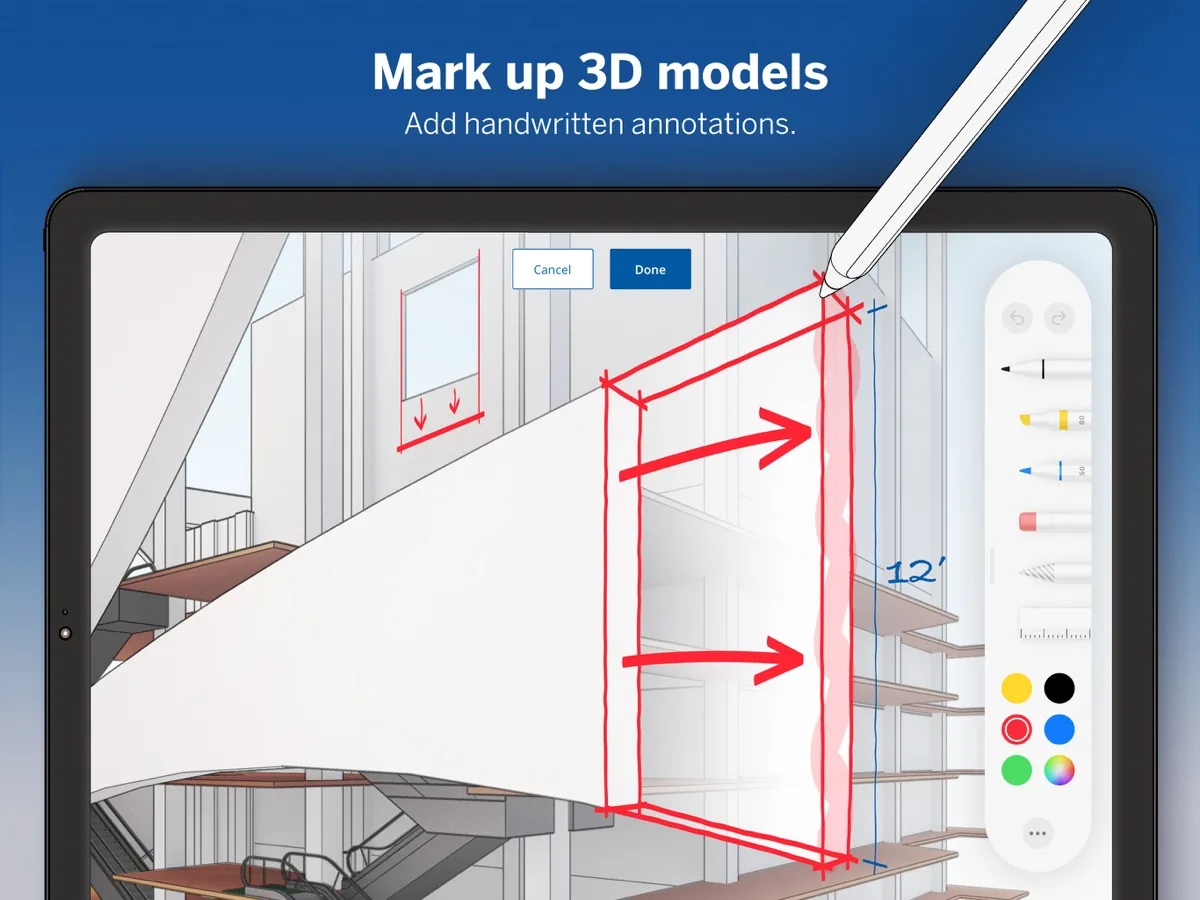
An iPad workflow becomes more compelling when the tablet is used where the design is being discussed. The official listing highlights workflows such as capturing a space, bringing an idea into 3D and marking up a model. These features can reduce the gap between a physical room, a quick conversation and the model used for the next design decision.
Scanning is not a substitute for a surveyed measurement or a professional coordination process. Treat a scan as a starting point, compare important dimensions with a reliable measurement method, and tell collaborators which information is approximate. The same rule applies to a quick field edit: keep the original file, use a dated working copy and avoid overwriting a production model before review.
Markup is especially useful for client and team conversations. A short note or drawn correction can communicate intent faster than a long message, but the annotation should still be converted into a clear task or revision record. The iPad is a portable modeling and review surface; it does not remove the need for file discipline.
- Use scan-based capture as an initial reference, not as a guaranteed survey result.
- Keep original and working copies separate before making field edits.
- Use annotations to explain a decision, then record the required revision clearly.
- Check cloud sharing and account ownership before uploading client or school files.
Check the iPadOS version, app version and device before installing
On August 22, 2026, the United States App Store listing showed SketchUp version 8.2.1, a size of 734.2 MB and a minimum requirement of iPadOS 18.6. Those are a dated verification snapshot, not a promise that the store will show the same values later. Before installing, open the listing for your region and compare its current requirements with the iPad you actually plan to use.
A compatible operating system does not guarantee a comfortable experience on every iPad. Model complexity, texture count, screen size, available storage, graphics performance and the number of other apps running in the background all affect the workflow. Leave enough storage for the app and working files, update iPadOS through the normal Apple process and test the model that matters to you rather than relying only on a feature list.
If the listing changes, update the version and size notes on this page before treating them as current. Do not download an IPA from a mirror to work around a device check. A changed store listing is a reason to recheck the official requirements, not to trust a repacked file.
- Open the App Store listing in the correct country or region.
- Compare the displayed iPadOS minimum with the device's installed version.
- Keep free storage for the app, cached assets and model files.
- Retest a representative model after an app or iPadOS update.
SketchUp for iPad vs Free, Go, Viewer and Pro
Many searches for a SketchUp iPad app are really plan-comparison questions. The table below keeps the product boundaries visible. The iPad app is the tablet surface; the account, plan and feature limits determine what you can do with it. If you need a browser-only personal workflow, start with the SketchUp Free guide. If you need desktop extensions or LayOut, compare the SketchUp Pro route instead.
SketchUp Go is the closest plan-level comparison because it centers on Web and iPad access. It is not a hidden free desktop download, and the presence of the app in the App Store does not mean every feature is unlocked without the relevant account or subscription. Regional pricing, trial terms and renewal conditions belong on the official plan page.
Viewer is a different intent: it is for opening and reviewing models rather than replacing a complete authoring workflow. For file-heavy or extension-dependent production, a Windows or Mac desktop installation remains the safer baseline until the iPad app has been tested against the exact requirements.
- Choose the iPad app when touch, Pencil input and portable modeling matter.
- Choose Free for a separate personal Web workflow within its limits.
- Choose Go when Web + iPad access and cloud continuity are the priority.
- Choose Viewer for review, and Pro for desktop production, LayOut and extensions.
Use a safe official download and file workflow
Start from the App Store listing linked above and check that the developer is Trimble Inc. The site does not provide IPA files, cracked packages or modified installers. An official store route gives you the platform's normal update, account and review surfaces and avoids a common download-site mistake: treating an unofficial mirror as if it were the product's publisher.
Before importing a client or school library, create a small test model and verify sign-in, opening, editing, saving, export and sharing. Keep a local copy of important SKP files when the workflow allows it, and confirm who owns a cloud file before sharing a link. A portable workflow is convenient, but it still needs naming, versioning and backup habits.
For related model resources, use the official 3D Warehouse guide and verify the component license and compatibility. For general desktop compatibility, use the SketchUp system requirements guide. These links support the iPad decision without turning this page into a duplicate of the desktop download pages.
- Use the official App Store listing and confirm Trimble Inc. as the developer.
- Avoid IPA mirrors, activation bypasses, repacked installers and download managers.
- Test account access and file actions with a non-critical model first.
- Keep backups and verify model rights before using third-party components.
Who should choose the iPad workflow?
SketchUp for iPad is a strong candidate for people who need a model during a site visit, client review, class, workshop or early design session. It is also useful when touch and Pencil input are part of the creative process. The most convincing reason to use it is not a feature checklist; it is that a representative task becomes easier to complete with the tablet in hand.
It is less suitable as the only environment when the project depends on a large desktop model, a specialist renderer, LayOut documents, Ruby extensions, offline production or strict workstation hardware. In those cases, use the iPad as a companion surface and keep the desktop workflow as the system of record until you have tested every required handoff.
The short verdict is simple: download the official app if you want to evaluate modeling and review on an iPad, but decide on the plan and production workflow separately. Recheck the App Store listing whenever you need current version, size, device or subscription information.
- Best fit: portable concepts, field review, teaching, client conversation and light modeling.
- Needs extra testing: large files, complex textures, imports, extensions and cloud sharing.
- Use a desktop companion when Pro, LayOut, renderers or offline production are required.
- Treat store version and device fields as time-sensitive facts.
Which SketchUp route fits an iPad user?
These are product boundaries, not a substitute for the current official plan and App Store terms.
| Route | Works on | Best for | Important boundary |
|---|---|---|---|
| SketchUp for iPad | iPadOS | Touch/Pencil modeling and portable review | App Store app; account and plan limits still apply |
| SketchUp Free | Web browser | Personal browser modeling | Separate Free for Web product with its own limits |
| SketchUp Go | Web + iPad | Portable paid workflow with cloud continuity | Not the full desktop Pro/LayOut workflow |
| SketchUp Viewer | Supported viewer platforms | Opening and presenting models | Review-focused, not a full authoring replacement |
| SketchUp Pro | Windows + macOS | Desktop production, LayOut and extensions | Requires desktop installation and eligible access |
SketchUp for iPad FAQ
Is SketchUp for iPad free?
The App Store listing is the correct place to see the current download, trial and subscription terms for your region. Do not assume that downloading the app creates unlimited free Pro access. SketchUp Free for Web is a separate product, and Go is a Web-and-iPad plan.
What is the current SketchUp for iPad version?
The United States App Store listing checked on August 22, 2026 showed version 8.2.1. App listings can change, so recheck the official page before using that number in deployment notes.
What iPadOS version does SketchUp require?
The same listing showed iPadOS 18.6 as the minimum system version on the check date. Confirm the live regional listing and your device's installed iPadOS version before installing.
Can I download a SketchUp IPA for iPad?
This site does not provide IPA files. Use the official Apple App Store listing and avoid cracked, modified or repacked packages from mirrors.
Is SketchUp for iPad the same as SketchUp Pro?
No. The iPad app is a tablet workflow, while Pro is the desktop choice for Windows or macOS, LayOut and a broader extension environment. Go is the closest plan comparison because it combines Web and iPad access, but its terms and limits should be checked on the official plan page.
Can I open a SketchUp model on an iPad?
The app is intended for opening and working with SketchUp models, but the practical result depends on file complexity, account access, supported actions and the current app version. Test a copy of a representative file before relying on it for production.
Is an iPad enough for a large SketchUp project?
There is no universal yes or no. Large textures, many components, import formats, extensions, storage and graphics performance can change the result. Start with a small test and keep a desktop workflow available for demanding production files.
Official sources checked
We verify download and support details against first-party SketchUp and Trimble pages. External sources open in a new tab.
- SketchUp - 3D Modeling on the Apple App Store — official app listing, version, size and minimum iPadOS fields checked August 22, 2026
- Official SketchUp Go plan — Web + iPad plan scope, pricing route and regional subscription terms
- SketchUp Go Help — official feature and account guidance
- 3D Warehouse Help — official model-library context and usage guidance