
The short answer: is SketchUp free for students?
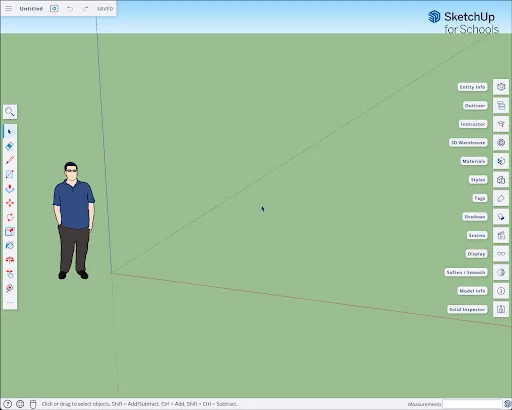
It depends on the type of school. SketchUp for Schools is a free browser-based product for eligible primary and secondary schools using Google Workspace for Education or Microsoft Education. It does not require the normal Windows or macOS desktop installer, and the school administrator may need to approve the app before a student can sign in.
College and university students use a different route. SketchUp currently lists a one-year SketchUp Studio subscription for students at US$55 per year on its United States education page. Availability, taxes, verification and the authorized reseller process vary by country, so treat the official regional education page as the price source rather than copying an old global coupon or reseller claim.
If neither education route applies, use SketchUp Free for personal browser modeling or the official Pro trial. The correct choice is based on school level, account system and required desktop features—not on finding a file labeled “student edition.”
Choose the correct SketchUp student route
Start by separating K–12 education from higher education. A student at an eligible primary or secondary school should ask whether the school uses Google Workspace for Education or Microsoft Education and whether SketchUp for Schools is enabled. This route runs in a supported browser and stores work through the connected education account.
A university, college, technical-school or other higher-education student should not assume the K–12 web app is the licensed route. The official higher-education offer is a time-limited individual education subscription. It is designed for learning and coursework, requires current student eligibility and may be fulfilled by an authorized education reseller in the buyer's country.
Do not select an option only because it says “free download.” First decide whether you need browser modeling, desktop SketchUp Pro, LayOut, extensions, advanced import/export or other Studio services. That feature decision prevents you from completing a project in the web edition and later discovering that a required desktop workflow is unavailable.
- K–12: confirm the school's Google or Microsoft education account.
- Higher education: verify current enrollment and regional purchase rules.
- Personal learning: compare SketchUp Free and the official Pro trial.
- Professional or commercial work: review the normal Pro or Studio terms instead of relying on education access.

K–12: how free SketchUp for Schools works
SketchUp for Schools is the clearest free SketchUp student option, but it is intended for eligible primary and secondary education. Students sign in with a school-managed Google or Microsoft education identity. If the app is missing or access is denied, the useful next step is usually to contact the teacher or IT administrator—not to create another personal account or download an unofficial installer.
Because it runs in the browser, SketchUp for Schools is practical on Chromebooks and managed classroom computers. It supports core 3D modeling, access to learning resources and cloud-connected work. It also avoids local installer permissions, which is helpful where students cannot install Windows or macOS applications themselves.
The browser model still has boundaries. A course that depends on desktop extensions, LayOut documents, specialized import/export formats or a particular rendering plugin may require the higher-education Studio route or a school-managed desktop license. Ask the instructor for the expected deliverable format before starting a semester project.
- Use the school-provided Google or Microsoft account.
- Ask the administrator to approve or deploy the app when sign-in is blocked.
- Test file saving and export before beginning an assessed project.
- Keep a separate exported SKP backup when the course or school account will end.
College and university: SketchUp Studio student license
Higher-education students are directed to SketchUp Studio for Students rather than a permanent free desktop edition. The United States page currently lists a one-year subscription at US$55 per year. The offer is for qualifying students, and the purchase or verification path can differ outside the United States. Use the region selector or authorized reseller link on the official education page to confirm the local amount, included taxes and accepted proof of enrollment.
A student subscription is normally tied to an individual Trimble account and current academic status. Prepare a school email address and evidence such as a current student card, enrollment letter or dated timetable if the local reseller requests it. Do not pay a seller that cannot show education authorization, renewal terms and the exact product being supplied.
The one-year term matters. Record the renewal date, confirm whether eligibility must be rechecked and plan how you will access project files after graduation. SKP files remain your work, but cloud storage, collaborative services and licensed desktop features may change when the subscription expires.
- Confirm that the offer is SketchUp Studio for Students, not an old perpetual license.
- Check the final local price and tax before payment.
- Use the same Trimble account for purchase, activation and desktop sign-in.
- Export important models before graduation or account deactivation.
Safe download and installation steps for students
The current desktop release verified for this guide is SketchUp 2026.2, released May 19, 2026. Higher-education students who receive desktop entitlement should sign in to the official account or download page and obtain the installer that matches Windows or macOS. We do not provide a fabricated “student installer” direct link because access, architecture and entitlement must be resolved by the official account flow.
Before installing, compare your computer with the SketchUp 2026 system requirements. Check the operating system, free SSD space, graphics support and course-required extensions. On a shared computer, confirm whether administrator permission is required and whether the license terms allow that deployment.
After installation, launch SketchUp and sign in with the Trimble account linked to the student entitlement. If the app opens in trial mode or reports no subscription, verify the email address first. Then review the account's products and ask the authorized reseller or institution to correct the assignment; repeated reinstalls rarely fix an account-entitlement mismatch.
- Download only from SketchUp Help, your Trimble account or an authorized education reseller.
- Match Windows or macOS and avoid obsolete installers from file mirrors.
- Sign in with the exact account that owns the education subscription.
- Keep course files outside temporary classroom folders and maintain backups.
What students get—and what changes by plan
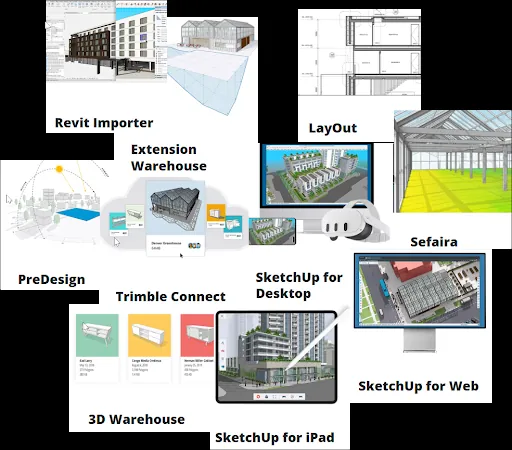
The K–12 browser route focuses on accessible classroom modeling. The higher-education Studio route is broader and is intended for students who need desktop SketchUp Pro, LayOut and connected professional workflows for coursework. Exact included services can change, and some advanced services or regional offers have separate platform requirements, so use the live official plan list as the final authority.
Extensions are a common deciding factor. Browser editions do not run the desktop RBZ extension ecosystem. Architecture, interior-design, fabrication and visualization courses may depend on extensions or renderers, and those tools may have their own student licenses, operating-system limits and SketchUp-version compatibility. Review our SketchUp plugins guide before assuming every classroom add-on is included.
Commercial use is another boundary. Education subscriptions are priced for qualified learning use. If paid client work, employment or a commercial studio becomes the primary purpose, review the normal SketchUp Pro licensing route and the current terms instead of assuming a student plan covers professional production.
- Browser access and desktop access are not interchangeable.
- LayOut and desktop extensions may determine which route you need.
- Third-party plugins can require separate licenses.
- Education eligibility does not automatically grant commercial-use rights.
Avoid fake student downloads and protect your files
A page offering a cracked “SketchUp student edition,” activation key, torrent or permanently free Studio installer is not the official education process. These files may be outdated, modified or bundled with unwanted software, and they cannot establish a legitimate Trimble account entitlement. A low difficulty keyword or popular video does not make the download trustworthy.
Use three checks: the destination should be an official SketchUp domain or a reseller named by SketchUp; the product and term should be written clearly; and the account should show the entitlement after purchase or school assignment. Never disable antivirus protection or operating-system security simply because an installer asks you to.
Finally, protect the models you create. Export milestone copies, keep local and cloud backups, document extension dependencies and transfer files before a school email is disabled. Open a representative project on the intended account and computer early, rather than discovering access or compatibility problems on the assignment deadline.
- Reject torrents, cracks, key generators and anonymous download mirrors.
- Verify the seller through the official regional education page.
- Back up SKP, LayOut and referenced asset files together.
- Plan account and file migration before graduation.
SketchUp options for students compared
Choose by school level and required workflow. Pricing and eligibility can vary by region, so verify the live official page before committing.
| Option | Best for | Cost / term | Runs where | Key limitation |
|---|---|---|---|---|
| SketchUp for Schools | Eligible K–12 students and teachers | Free through eligible school account | Supported web browser | School Google/Microsoft setup; no desktop extension workflow |
| SketchUp Studio for Students | College and university coursework | US page lists US$55/year; regional verification applies | Windows/macOS desktop plus included services | Annual eligibility and education-use terms |
| SketchUp Free | Personal learning outside managed school access | Free | Web browser | Reduced professional features and no desktop RBZ extensions |
| SketchUp Pro trial | Short desktop evaluation before purchase | Free for the official trial period | Supported Windows/macOS | Time limited; converts to paid access if purchased |
SketchUp student FAQ
Is SketchUp free for university students?
Not as a permanent full desktop license. The official United States higher-education page currently lists a one-year SketchUp Studio student subscription at US$55. Other countries may use different pricing or authorized resellers.
Is SketchUp for Schools the same as SketchUp Studio for Students?
No. SketchUp for Schools is a free browser product for eligible K–12 organizations. Studio for Students is a higher-education subscription with desktop and connected professional tools.
How do I download SketchUp with a student license?
Complete the official education purchase or school assignment, sign in with the same Trimble account, and use the official account or SketchUp download page. There is no separate trustworthy public file that becomes a student license by itself.
Can I use my personal Gmail account for SketchUp for Schools?
The K–12 product normally requires an eligible school-managed Google Workspace for Education or Microsoft Education account. Ask your teacher or administrator if the app is unavailable.
What is the latest SketchUp version for students?
The current desktop release checked on July 23, 2026 is SketchUp 2026.2. Browser products update through the service and do not use the same downloadable installer workflow.
Can students install SketchUp on both Windows and Mac?
A desktop education entitlement can provide supported installers, but activation limits and included products follow the current subscription terms. Download the correct installer and check course plugin compatibility before switching platforms.
What happens to my SketchUp files after graduation?
Keep exported local copies before the school account or education subscription ends. The files remain important project assets, but cloud access, licensed features and shared resources may change when entitlement expires.
Official sources checked
We verify download and support details against first-party SketchUp and Trimble pages. External sources open in a new tab.
- SketchUp plans and pricing for higher education — official student pricing, plan and reseller route
- SketchUp for Schools access — official K–12 browser application entry
- SketchUp education help — official K–12 and education account guidance
- SketchUp Desktop 2026.2 release notes — official release date and current desktop version
- Downloading SketchUp — official installer and supported-version source