Quick verdict: which SketchUp alternative should you choose?
Choose by workflow, not by the longest feature list. For free artistic modeling and rendering, begin with Blender. For dimension-driven mechanical objects, FreeCAD or Autodesk Fusion is a closer fit. For room layouts and furniture planning, Sweet Home 3D is faster to learn. Onshape works well for browser-based parametric collaboration, Shapr3D favors direct modeling with pen and touch, and Tinkercad is the easiest entry point for simple models and 3D printing.
None is a perfect drop-in replacement. SketchUp's push-pull modeling, extension ecosystem, LayOut workflow and SKP format create a particular combination. A better alternative may improve one job while making another harder. Test one representative project, one required import and one required export before moving a library or team.
If your main problem is price rather than workflow, first compare legitimate SketchUp Free options. Staying in SketchUp for Web may preserve familiar tools and SKP access with less migration work than adopting a completely different modeler.
Match the software to the work you need to finish
Start with the final deliverable. An architect creating fast massing studies needs different behavior from a maker producing dimensioned parts, an interior designer arranging furniture, or a visualization artist rendering a scene. SketchUp feels flexible because it covers several of these jobs, but its alternatives tend to specialize.
Write down five requirements before testing: the operating systems you use, whether work must stay offline, the largest model you expect, the file formats collaborators require, and whether commercial use is allowed by the chosen plan. This prevents a free product from becoming expensive later through missing exports, public-document rules, cloud dependence or paid add-ons.
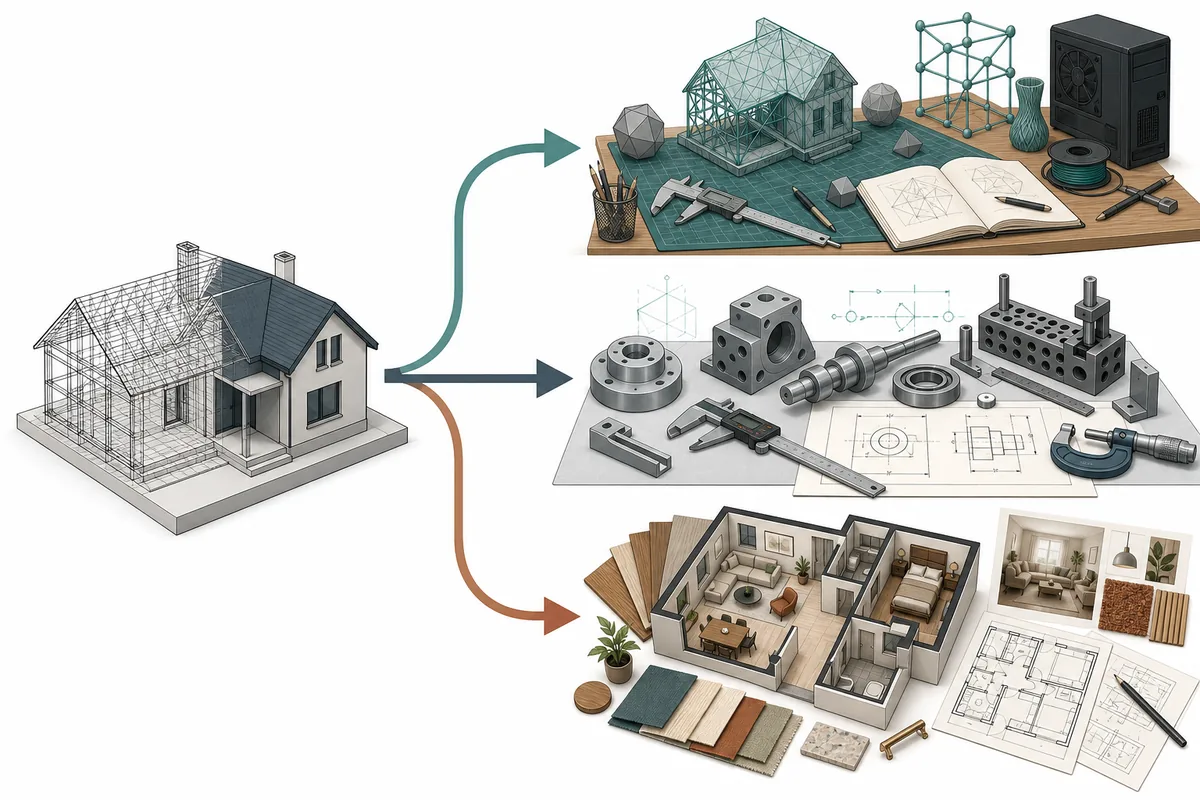
The image below is an editorial illustration, not a screenshot of any product. It shows why one model can branch into concept design, precision CAD or interior planning—and why the right SketchUp competitor depends on the branch you follow.
- Concept buildings and visualization: prioritize fast shape editing, materials and rendering.
- Mechanical parts and fabrication: prioritize constraints, dimensions, assemblies and neutral CAD formats.
- Interior planning: prioritize walls, rooms, furniture libraries, elevations and understandable plans.
- Team collaboration: check permissions, version history, private-document rules and offline access.
- 3D printing: test manifold geometry, scale control and STL or 3MF export.
Best free SketchUp alternatives: Blender, FreeCAD and Sweet Home 3D
Blender is the most capable free choice when the goal extends beyond architectural drafting into organic modeling, animation, procedural geometry or high-quality rendering. It is open source and runs on major desktop platforms. The tradeoff is a deeper interface and a workflow that does not imitate SketchUp. Exact architectural documentation and quick SKP-based collaboration may require extra setup or a different exchange format.
FreeCAD is a stronger fit for parametric and engineering-style work. Instead of treating every object as loose faces and edges, it encourages dimensioned sketches, features and editable constraints. That makes it useful for parts, furniture components and fabrication, but less immediate for a beginner who wants to draw a room by eye. FreeCAD is open source and supports Windows, macOS and Linux, making it the clearest native Linux option in this comparison.
Sweet Home 3D narrows the problem to homes and interiors. Its 2D plan plus 3D preview approach is easier for room layouts, furniture placement and quick residential concepts. It is not a general replacement for complex solids, extension-heavy workflows or detailed construction documentation. Choose it when the main question is where walls and furniture go, not how to build a universal 3D asset pipeline.
- Choose Blender for rendering, animation, sculpting and broad 3D creation.
- Choose FreeCAD for constrained parts, dimension-driven revisions and Linux desktop use.
- Choose Sweet Home 3D for floor plans, furniture layouts and low-friction interior concepts.
- Download open-source applications only from their official site or verified project repository.
Precision and product design: Fusion, Onshape and Shapr3D
Autodesk Fusion combines parametric modeling, direct editing and manufacturing workflows. It is often a better SketchUp alternative for parts that must fit, change by dimensions or move toward CNC and 3D-print production. Autodesk offers a personal-use route for qualifying non-commercial users, but its capabilities and terms are limited compared with commercial subscriptions. Confirm the current eligibility and export rules on Autodesk's site rather than assuming every tutorial uses the same plan.
Onshape brings parametric CAD into a browser and makes version history and collaboration central to the product. It avoids a traditional desktop installation and works across many devices, but the free plan is designed around public documents. That is a major boundary for confidential client, school or invention work. Check privacy and plan rules before uploading an existing project.
Shapr3D emphasizes direct modeling and a touch-friendly workflow, especially on iPad with Apple Pencil, while also supporting desktop platforms. It can feel more approachable than a traditional feature-heavy CAD interface. The basic tier has practical limits, and advanced drawings, imports, exports or visualization may depend on a paid plan. It is a good candidate when mobility and direct manipulation matter more than SketchUp extensions.
- Fusion: good for parametric parts, fabrication and a design-to-manufacturing path.
- Onshape: good for browser collaboration when public-document rules are acceptable or a paid plan is available.
- Shapr3D: good for pen, touch and direct solid modeling across mobile and desktop devices.
- For commercial work, verify the exact license instead of equating 'free to start' with unrestricted use.
The easiest browser option: Tinkercad—and when SketchUp Free is better
Tinkercad is a free web application built around combining and subtracting simple shapes. It is excellent for first models, classroom exercises, basic enclosures and printable objects. Its simplicity is also the limit: complex architecture, large assemblies and professional documentation quickly outgrow it. Treat it as an accessible starting tool rather than a complete SketchUp Pro replacement.
SketchUp Free is not technically a competitor, but it belongs in the decision because it preserves the familiar modeling language. If you only need personal browser modeling and can work within the web product's limits, it may require less retraining and fewer file conversions than an alternative. It also keeps you closer to 3D Warehouse and the SKP ecosystem.
Browser tools reduce installation problems, but they add account, connection and cloud-storage questions. Before committing, test what happens when the connection drops, how projects are exported, whether links are public, and how a local backup can be restored.
- Use Tinkercad for learning, classroom projects and simple printable geometry.
- Use SketchUp Free when familiar push-pull modeling and SKP continuity matter most.
- Do not upload confidential work until you understand document visibility and account terms.
- Export a local test file before building a long-term library in any browser platform.
Moving from SketchUp: test SKP, textures, scale and components
A program can import an SKP file and still lose important behavior. Components may become ordinary groups, materials can disconnect from texture files, scenes may disappear, tags can flatten, and dimensions or LayOut documents may not transfer. Use a migration sample with nested components, curves, transparent materials, external textures and a known real-world dimension; edit it, export it and inspect the result in the software used by your client or fabricator.
When direct SKP exchange is unreliable, consider neutral formats according to the job: IFC for BIM-oriented building exchange, STEP for solid CAD, DWG or DXF for drawings and curves, OBJ or FBX for meshes and materials, and STL or 3MF for printing. No neutral format carries every SketchUp feature, so keep the original SKP file and external textures as an archive.
Do not choose from screenshots alone. Spend two focused hours with the same small project in two finalists and measure editing, export and handoff—not only the first attractive view. The product-neutral illustration below summarizes the main destinations without pretending there is one universal winner.
- Never convert your only copy; preserve the original SKP and linked assets.
- Check units and one known dimension after every import and export.
- Inspect face orientation, smoothing, material paths and nested instances.
- Confirm the recipient can open the exported version before migrating a full project.
- Review the SketchUp system requirements if performance—not features—is the reason you plan to switch.
SketchUp alternatives compared
This table is a workflow screen, not a substitute for checking live plan terms. Free tiers, privacy rules and supported formats can change.
| Option | Best for | Platform | Free route | Main tradeoff |
|---|---|---|---|---|
| Blender | Rendering, animation and broad 3D creation | Windows, macOS, Linux | Open source | Steeper learning curve; not a SketchUp-style CAD workflow |
| FreeCAD | Parametric parts and fabrication | Windows, macOS, Linux | Open source | Less immediate for fast architectural concept modeling |
| Sweet Home 3D | Floor plans and interior layouts | Desktop and web options | Free/open-source desktop edition | Narrower general modeling and documentation scope |
| Autodesk Fusion | Product design and manufacturing | Windows, macOS, web services | Limited personal-use route for qualifying users | Account, cloud and license limits; not fully free for commercial work |
| Onshape | Browser CAD and collaboration | Modern browser and mobile apps | Free plan with public documents | Confidential work requires careful plan selection |
| Shapr3D | Pen, touch and direct solid modeling | iPadOS, macOS, Windows | Basic tier | Advanced export, drawing and visualization limits |
| Tinkercad | Beginners, education and simple 3D prints | Web browser | Free | Too simple for complex architecture or professional documentation |
SketchUp alternative FAQ
What is the best free SketchUp alternative?
Blender is the strongest free all-rounder for modeling and rendering, while FreeCAD is better for parametric and engineering work. Sweet Home 3D is easier for interiors. The best choice depends on the required output, not only the price.
Is there a SketchUp alternative for Linux?
Yes. Blender and FreeCAD both provide native Linux versions. Blender suits broad 3D creation and visualization; FreeCAD is better for dimension-driven CAD. Test required exchange formats before switching.
Can Blender replace SketchUp for architecture?
Blender can handle architectural modeling and excellent visualization, but it does not reproduce SketchUp's exact push-pull, extension, LayOut and SKP workflow. It is strongest when rendering and flexible mesh creation matter more than familiar documentation.
Which SketchUp competitor is best for interior design?
Sweet Home 3D is the simplest choice for floor plans and furniture layouts. Shapr3D offers more direct solid modeling, while Blender gives more visualization control at the cost of a steeper learning curve.
Can alternatives open SKP files?
Some applications or versions can import SKP, but support varies and may not preserve components, scenes, tags, materials or extension data. Always test a representative file and keep the original SKP archive.
Should I switch or use SketchUp Free?
Use SketchUp Free when the browser product covers your personal modeling needs and SKP continuity matters. Switch when another tool clearly improves a required workflow such as parametric parts, rendering, Linux support or interior planning.
Are free CAD plans safe for commercial projects?
Not automatically. Open-source licenses, personal-use plans, public-document plans and basic tiers have different rules. Read the current publisher terms and privacy settings before using a free route for client or confidential work.
Official sources checked
We verify download and support details against first-party SketchUp and Trimble pages. External sources open in a new tab.
- Blender features — official open-source modeling, animation and rendering overview
- FreeCAD features — official parametric CAD and platform overview
- Sweet Home 3D — official interior-design product and download information
- Autodesk Fusion for personal use — official eligibility and plan limitations
- Onshape Free — official browser CAD and public-document plan details
- Shapr3D product overview — official platform and modeling workflow overview
- Tinkercad 3D Design — official free browser modeling product
- SketchUp Desktop 2026.2 release notes — official current-version verification for this download site